






Trusted by 40.000+ storytellers worldwide

Immerse your audience with interactive geospatial storytelling

Stop settling for static map embeds. Timepath GEO Story provides an editorial-grade toolkit to transform coordinates into immersive narrative experiences. From complex investigative reporting to curated local guides, Timepath GEO Story combines immersive guided tours with interactive data layers to give your audience the spatial context, proximity, and scale they need to truly navigate your story.

Loved by leading newsrooms worldwide

Join the ranks of top newsrooms leveraging Timepath to enhance their storytelling and audience engagement.

RTL Nieuws logo
Luxembourg Times logo
ED logo
Daily Pakistan logo
HLN logo
Algemene Dagblad logo
BD logo
Telegraaf logo
1 billion+
Pageview stories
50+
Newsrooms
25%+
Time saved
Engagement

Turn passive readers into active explorers

Give your audience more than a static pin. With smart markers, immersive guided tours, and shareable bucket lists, Timepath GEO Story transforms your reporting into a destination. Empower your readers to navigate through deep-dive investigations or save their favorite spots, providing the utility that turns a single visit into a lasting connection.

Tools built for deep exploration

Don’t just show: engage. Our features are designed to turn passive readers into active participants. Use the bucket list mode to build reader loyalty, or deploy guided tours to provide a seamless narrative flow that keeps your audience on the page longer.

Smart markers

Embed rich media directly into every map pin

With smart markers, you can embed map pins with video, audio, images, and long-form text to create a centralized hub for your reporting. Readers can explore content instantly without ever navigating away from the map. By keeping all assets in one place, you provide a seamless user experience that reduces bounce rates and boosts engagement.

Zone highlighting

Visualize scale and proximity with zone highlighting

Static pins often fail to capture the full scope of a story. Draw custom shapes to clearly represent neighborhood borders, evacuation zones, or regional districts. This feature provides the visual precision needed to show exactly how much territory a news event covers, moving beyond simple coordinates to show the real-world area of impact.

Visual layers

Toggle map visuals to fit any reporting context

Elevate your reporting by choosing the exact visual layer that supports your narrative, from high-detail satellite imagery to tiltable 3D landscapes. Toggle to a minimalist layer to make election districts pop or utilize 3D street view to show exact vantage points in a crime scene reconstruction. This level of control ensures your maps feel like custom-built editorial assets rather than generic pins, establishing instant authority with your audience.

Map visuals
List overview
Overview & filters

Empower you audience to explore on their own terms

The overview button provides an organized, chronological directory of every location on your map. By using integrated filters, readers can strip away the clutter to see only the categories they care about, turning a vast data set into a personalized, easy-to-navigate experience.

Bucket list mode

Drive recurring traffic with bucket list mode

Enable readers to "tick off" locations they've visited or would like to go directly within the map. Transform static content into a functional interactive utility that incentivizes repeat visits with fully saved user data for long-term audience investment. Perfect for "Top 10 Hidden Bars" checklists or seasonal festival maps they can explore and complete as they go.

Bucket list mode
Guided tours

Guide your readers through complex spatial stories

Lead your audience through a curated, step-by-step journey that prioritizes narrative flow over static coordinates. Eliminate reader choice paralysis with cinematic controls that ensure every visitor follows your specific editorial arc from start to finish. Navigate readers through a high-stakes migration route or host a seamless walking tour of a city's cultural landmarks.

Testimonials

What chief editors say about Timepath

Laura Coppens
Laura Coppens

Online content specialist

We just celebrated our 25 year anniversary of our company. With Timepath we were able to create a beautiful timeline about our company history and share our achievements. The tool is quick and easy to use!

Jolanda Vogelaar
Jolanda Vogelaar

Journalist, DPG Media

Timepath timeline maker meets a need we already had: a tool that allows you to quickly and user-friendly create beautiful, clear timelines. Timelines lead to an increase in the engagement rate, and visitors spend more time reading our articles.

Dennis van Luling
Dennis van Luling

Chief Editor, RTL Nieuws

As the chief editor of RTL Nieuws, I can confidently say that with Timepath liveblogging, we're able to provide real-time updates to our readers as events unfold, keeping them informed and engaged like never before.

How top newsrooms use Timepath GEO Story

Discover how leading newsrooms use geospatial storytelling to deliver immersive, interactive experiences of complex stories.

Use case GEO Story

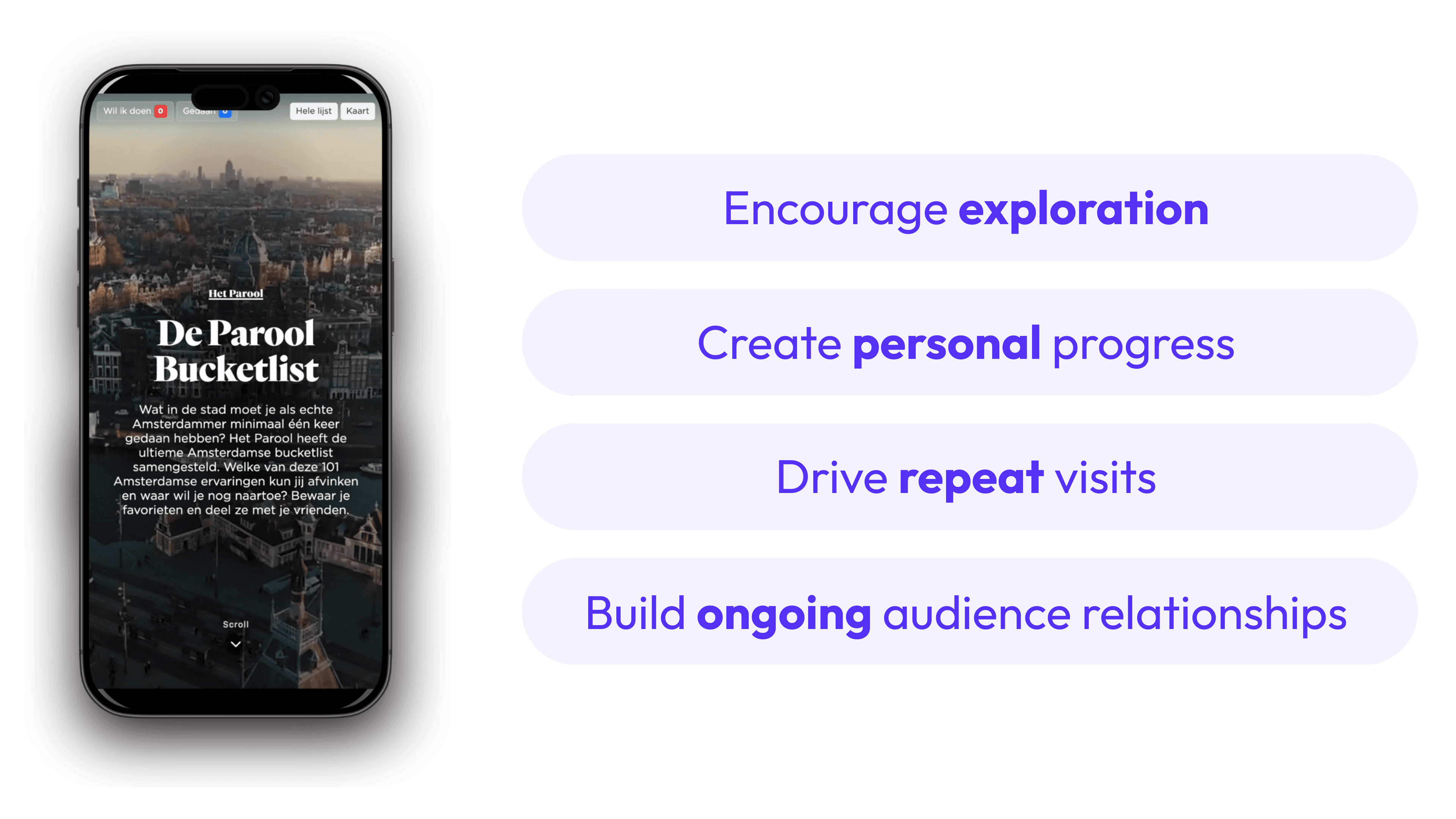
Het Parool drives recurring engagement with GEO Story’s bucket list mode

Het Parool transformed their city guides into a high-utility experience featuring 101 must-visit spots across Amsterdam. Integrated filtering for restaurants and landmarks allows readers to navigate the city seamlessly while "ticking off" visited locations or saving future destinations. With fully saved user data and custom social sharing cards, this interactive map converts a static guide into a unique tool that incentivizes repeat visits.

5
FAQ

Frequently Asked Questions

From timelines and liveblogs to quizzes, polls, and collections, find answers to the most common questions about creating, customizing, and publishing interactive content with Timepath.

What is Timepath GEO Story?

How can our newsroom use Timepath GEO Story?

How do we embed Timepath GEO Stories, and is it good for SEO?

What are the key benefits of using Timepath GEO Story over standard maps?

Subscribe for updates

Stay up to date by subscribing to our newsletter